One workspace for CA, CS, and accounting teams to run client work end to end — compliance, documents, billing, and time, with access scoped by role, module, and client. First 30 days free for up to 10 users.
Pick a friction — see how Cam-Desk replaces the tab-hopping.
01
Work scattered across email, chat, and spreadsheets
Cam-Desk answer
Every request becomes a tracked assignment with owner, status, and account.
02
Deadlines and filings slip through the cracks
Cam-Desk answer
Reminders and shared status keep compliance work visible to the right people.
03
Files and credentials live in the wrong places
Cam-Desk answer
Drive and Vault stay permissioned — next to the assignment, not in WhatsApp.
04
Partners lack a clear view of delivery
Cam-Desk answer
List, Kanban, and billing connect to the same backlog your team already runs.
cam-desk · modules
Modules that share one org model.
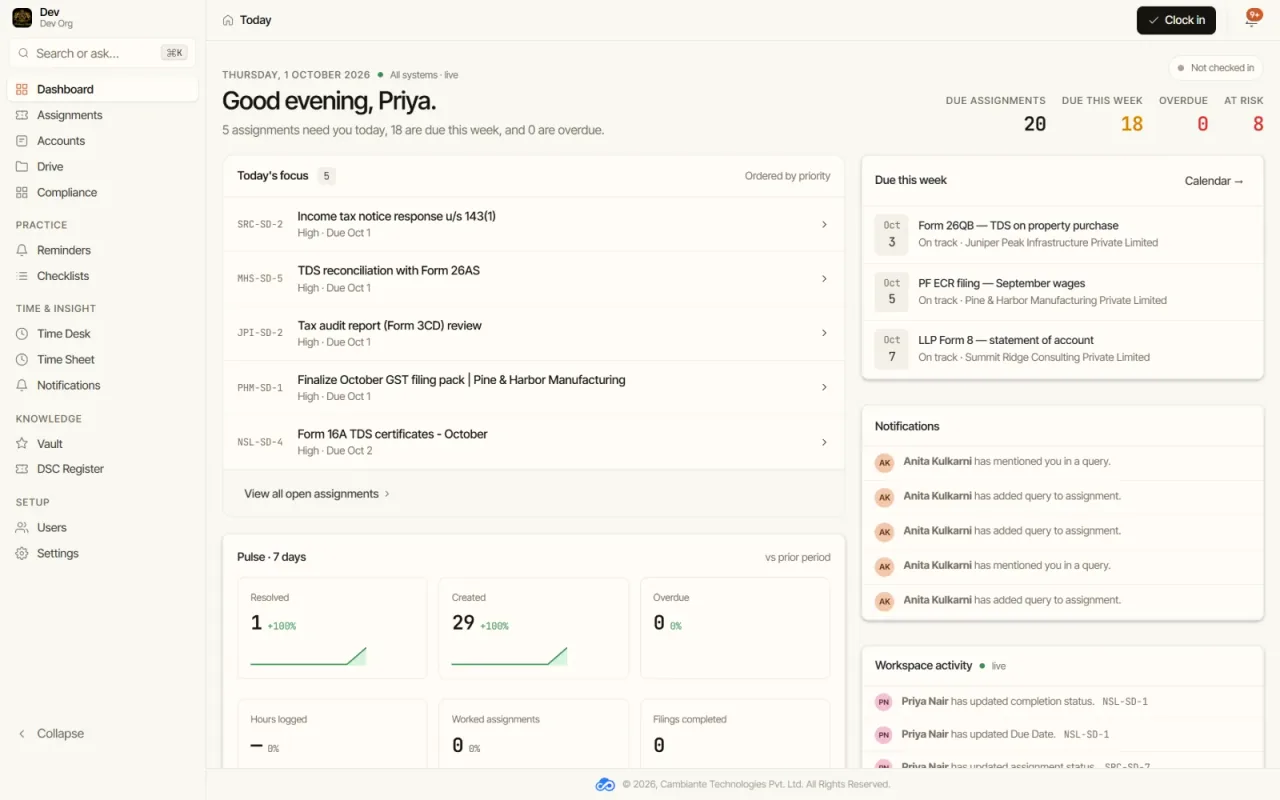
19 modules in 5 groups — assignments, Drive, AI, billing, TimeDesk, and more. Same accounts, same permissions. Scroll on to see the real UI.
Primary operations
The work that lands every morning — assignments, AI, reminders, accounts, and reports.
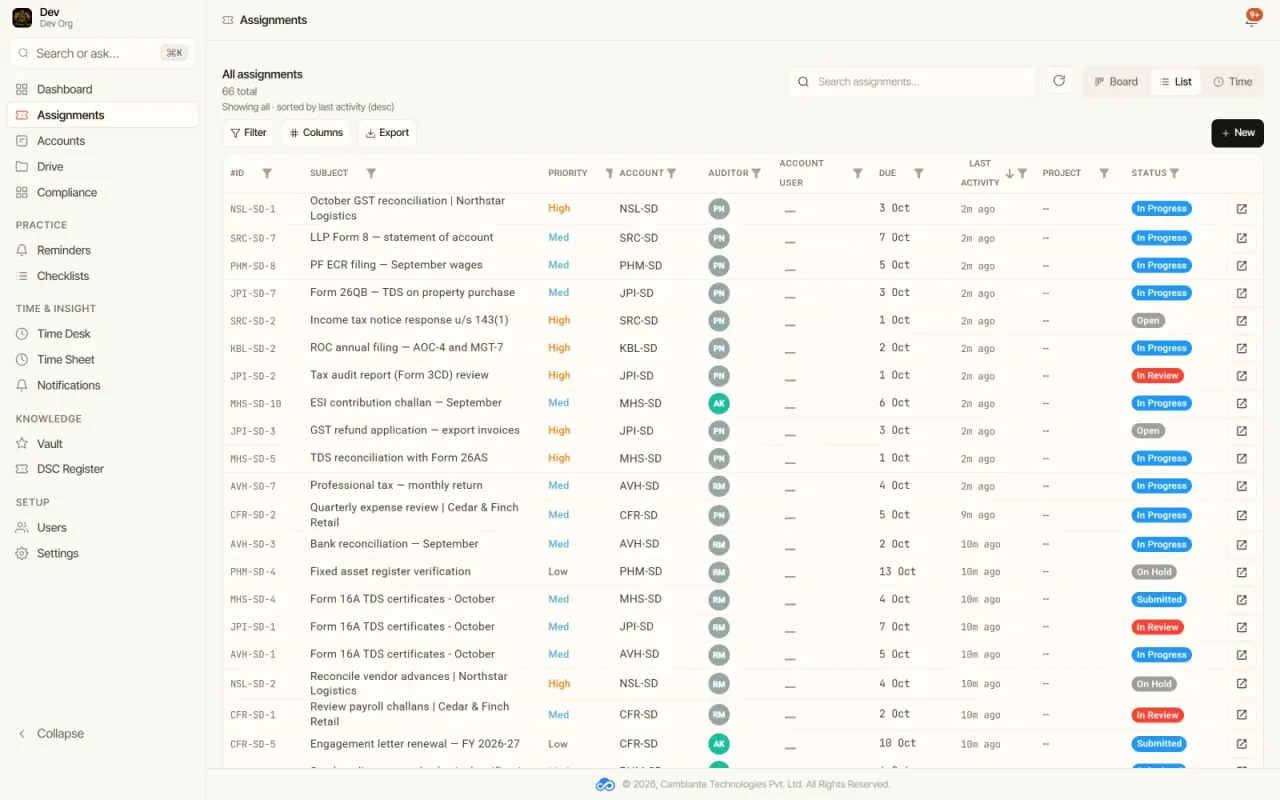
Assignments, tasks & queries
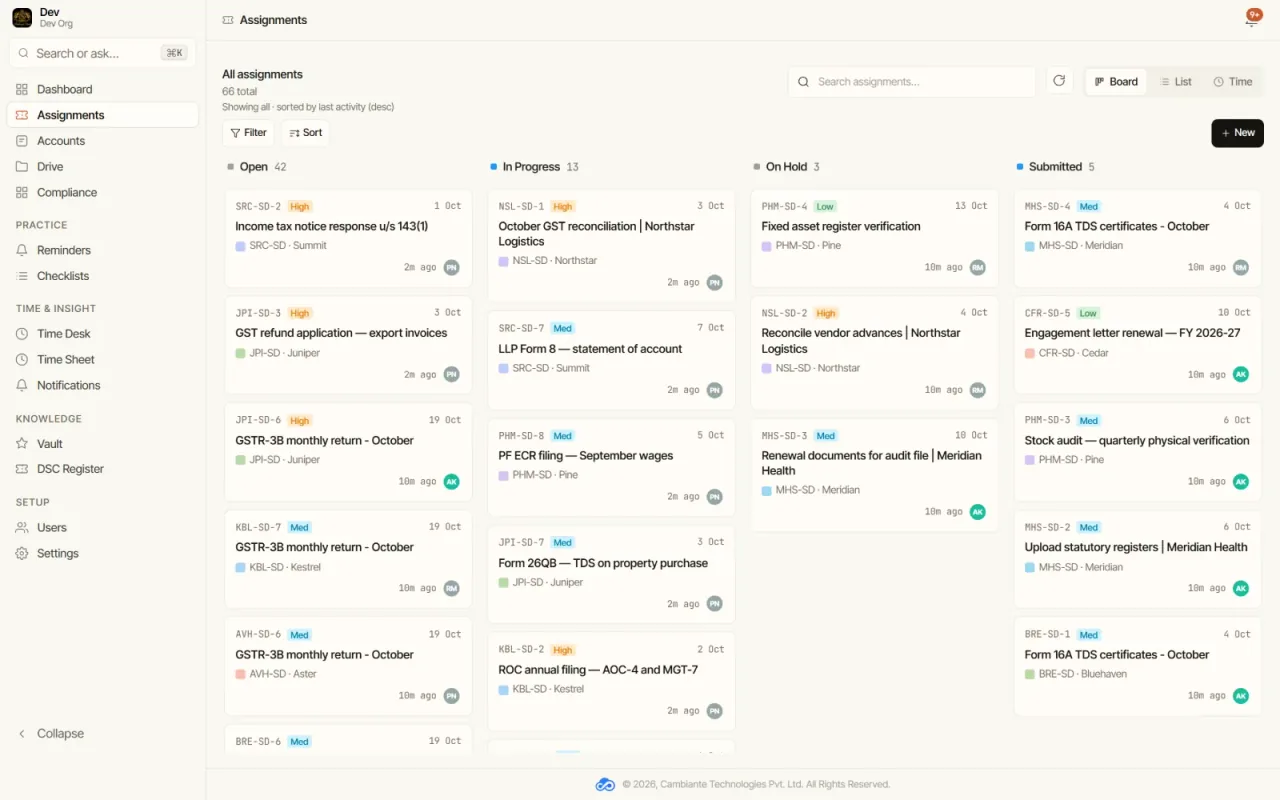
List · Kanban
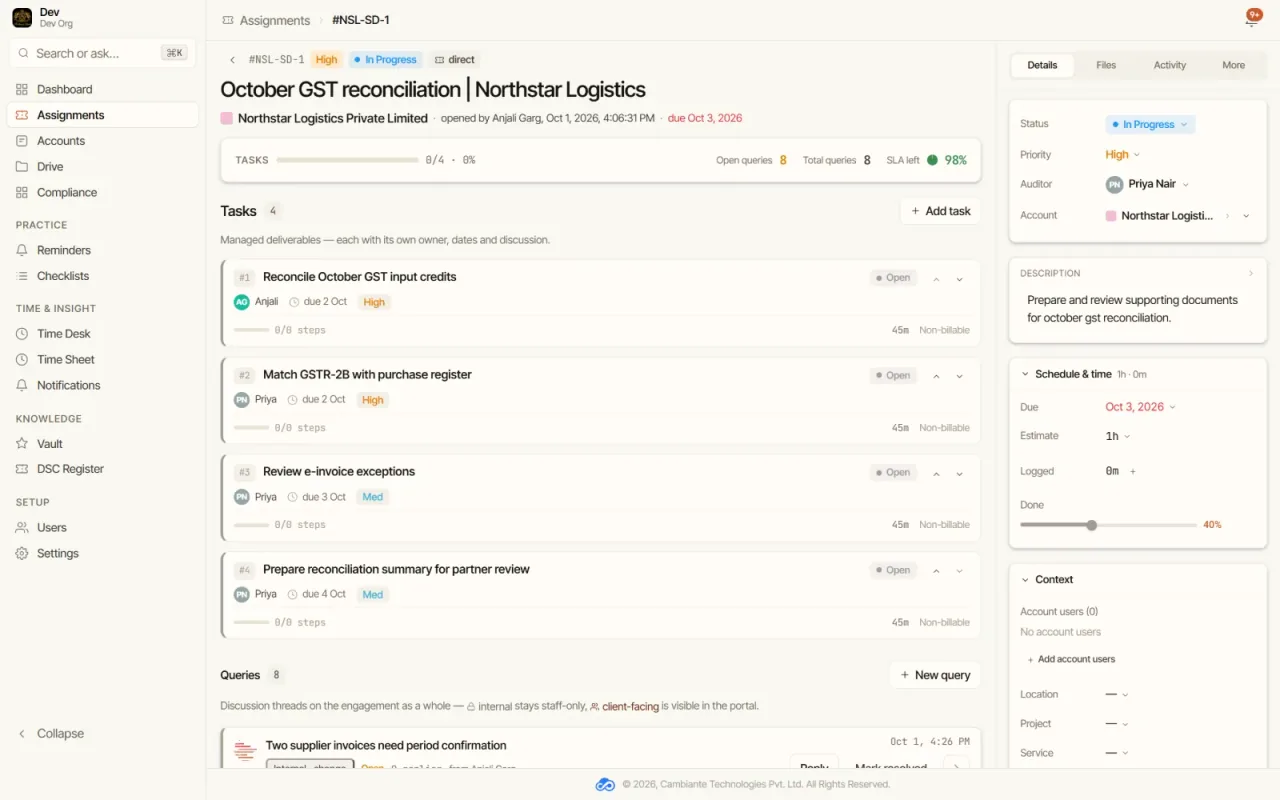
Run intake, triage, collaboration, and closure with list and Kanban views. Assignments hold tasks and threaded queries, with status, priority, assignee, and account on one record. Client emails become assignments, and templates start repeatable work.
AI Assistant
Permission-aware
An in-product assistant over assignments, files, and workspace context — scoped by your permissions, not a generic chatbot. Sessions keep follow-up context.
Reminders & follow-ups
Deadlines · snooze
Snooze, complete, and deep-link reminders so filings and client follow-ups stay visible to the right people.
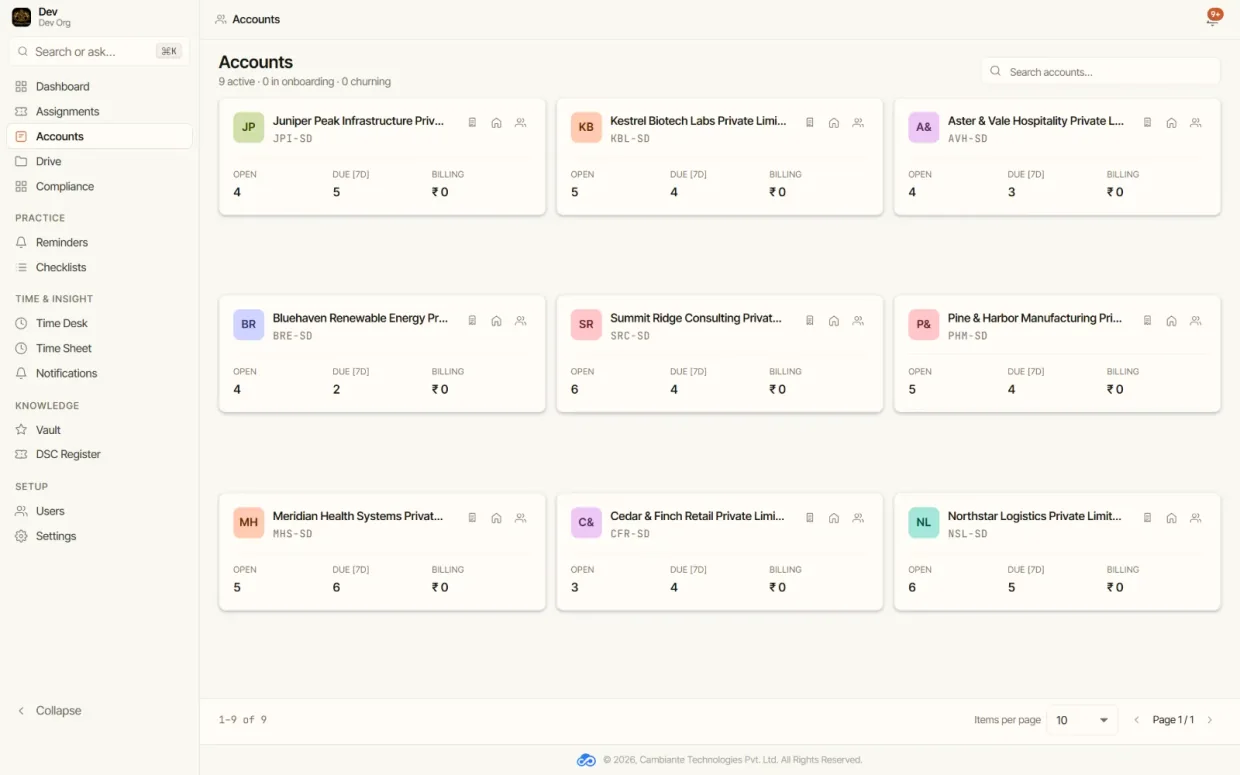
Accounts & clients
One org model
Clients sit at the centre of assignments, Drive, contracts, invoices, and reports — so permissions and context stay consistent. Client users sign in, scoped to their account.
Reports
Org · account
Organisation and account-level reports so partners see workload and delivery without exporting CSVs by hand.
Practice & delivery
From agreement to filing — no duplicate records.
01
Contracts & services
Agreement · execution
Manage contracts and linked services so delivery, assignments, and billing share the same client context.
02
Invoicing & billing
Zoho-aligned
Create and manage invoices with Zoho-aligned flows — tied to the work your firm already tracks, not a side spreadsheet.
03
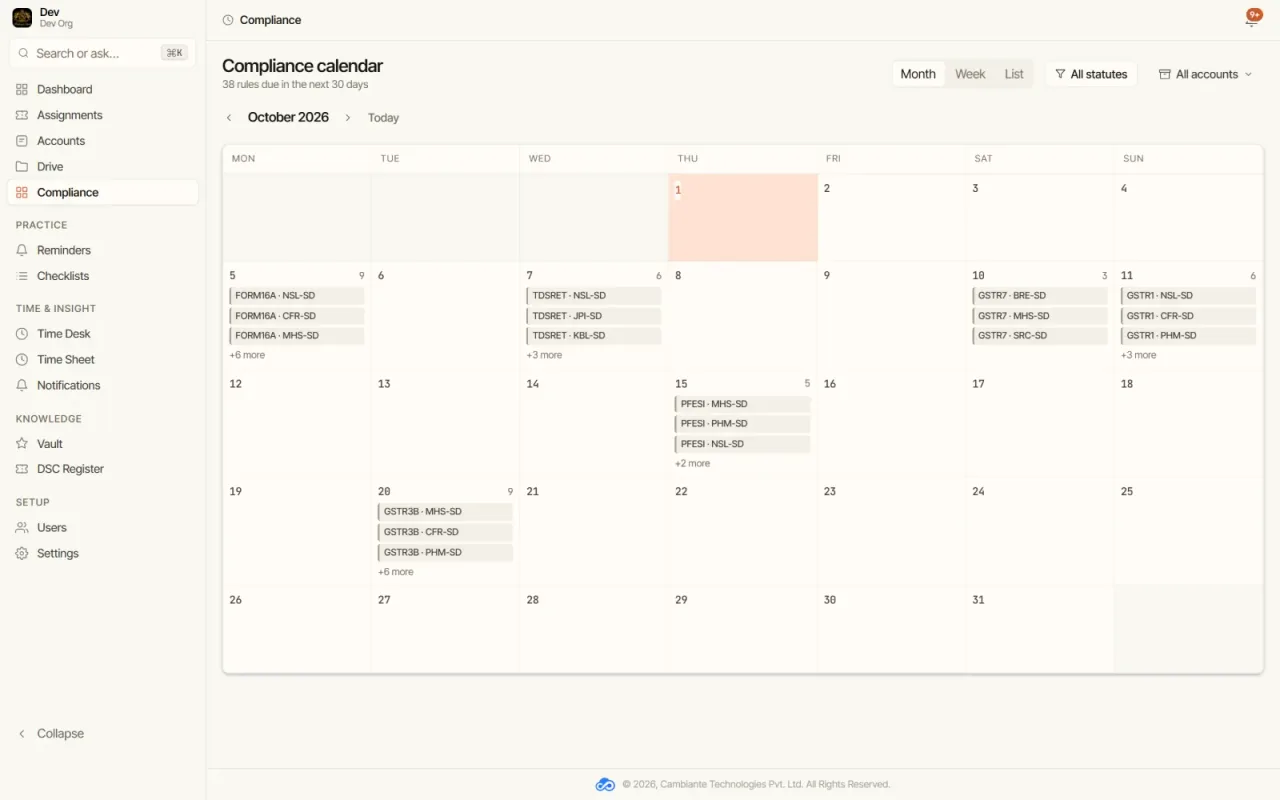
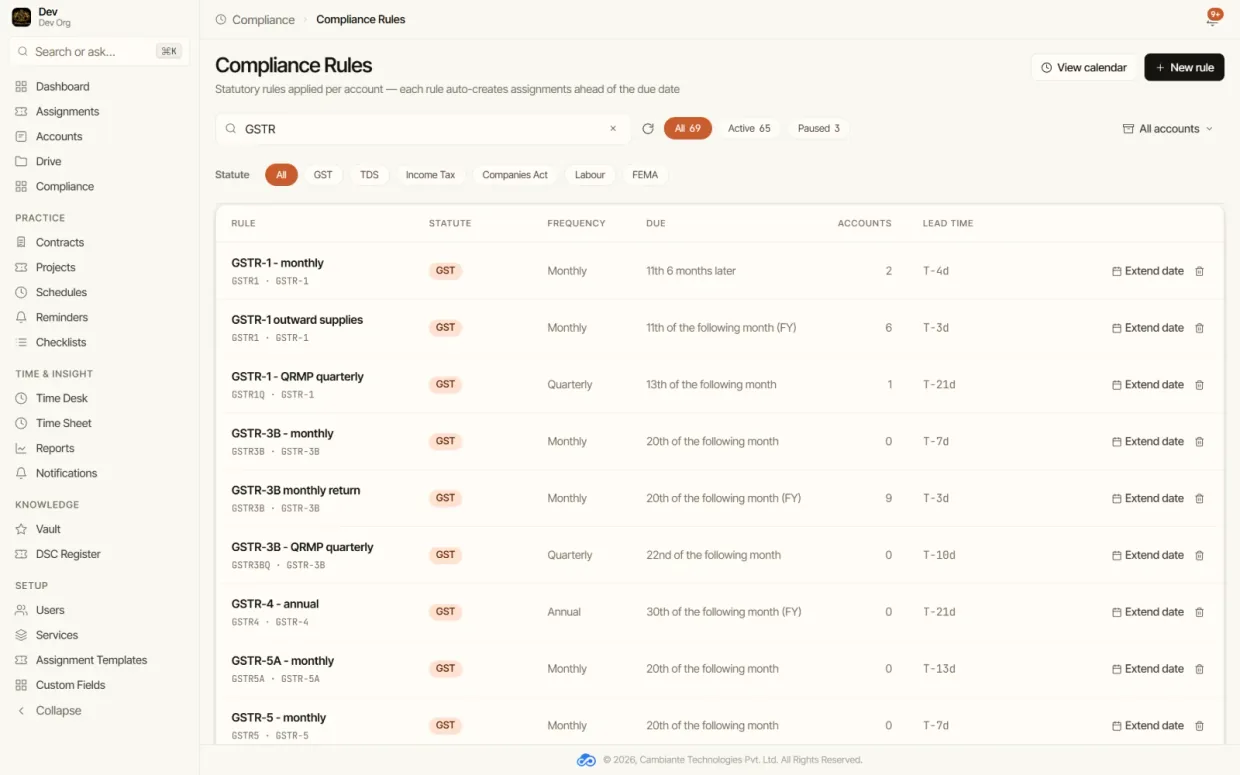
Compliance calendar & rules
Statutory cycles
Plan compliance work with calendar views and configurable rules — mapped to client accounts so statutory dates do not slip.
04
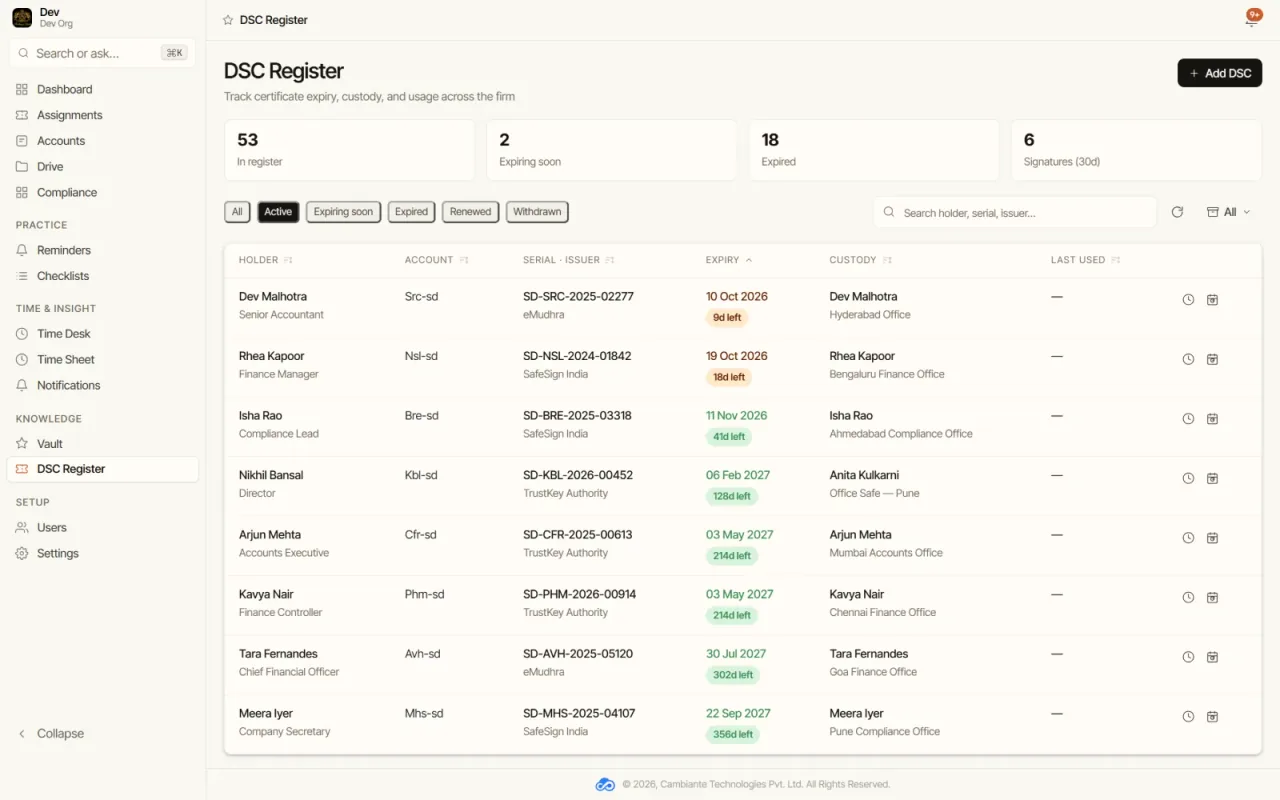
DSC register
Certificates · expiry
Maintain digital signature certificate inventory and usage visibility for firms that handle filings and authorised signing.
05
Schedules
Recurring work
Define recurring operational schedules that keep work visible, owned, and organised across teams.
06
Checklists
Quality bar
Standardise delivery steps with reusable checklists so junior and senior staff follow the same quality bar — fewer missed handoffs.
07
Projects
Group delivery
Organise related work into projects when an engagement needs a broader container than a single assignment.
Time & workforce
Attendance, leave, and timesheets — not a separate HR island.
TimeDesk & workforce
Attendance · leaves
Capture attendance, leave requests, leave types, and timesheets against the same firm operations stack — with capacity visibility for managers.
Files & secrets
Everyday documents and credentials, kept apart.
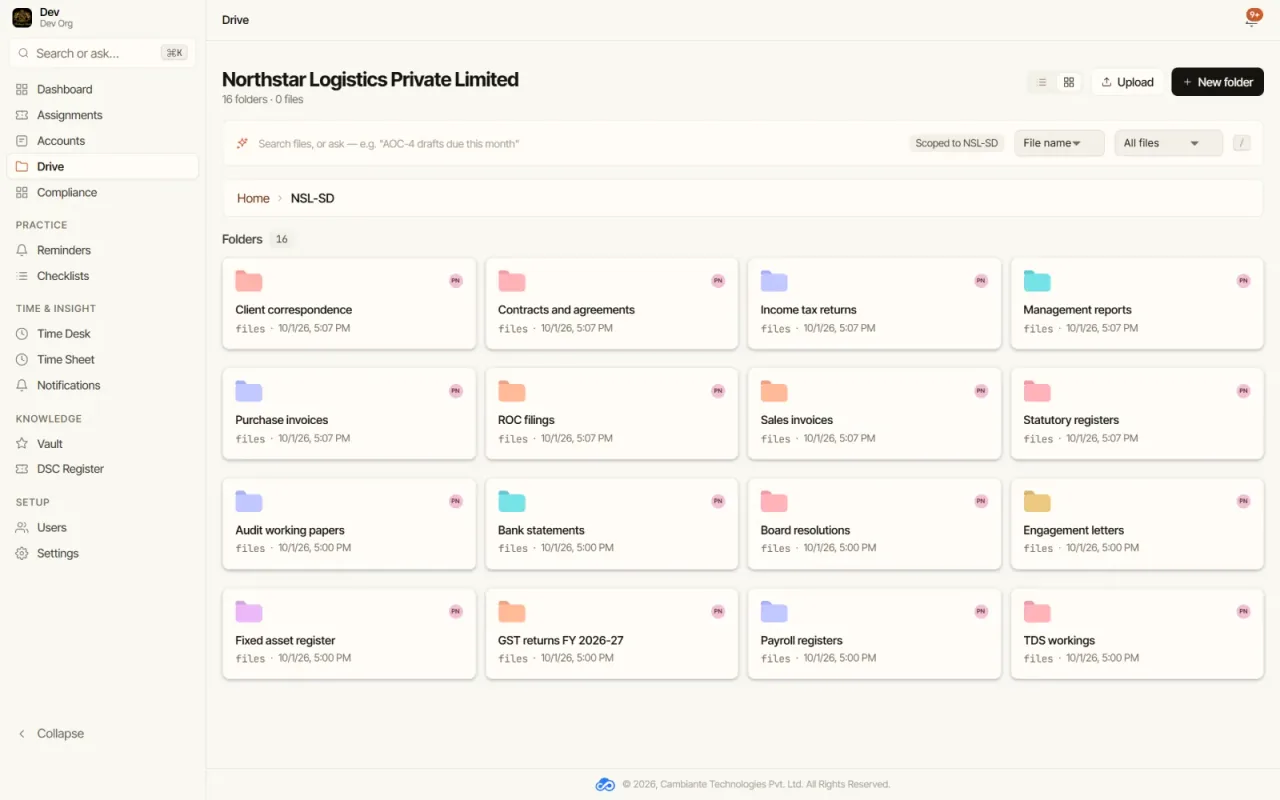
Drive & files
Folders · sharing
Store and share engagement letters, filings, and uploads with folder structure, sharing controls, preview, and search — tied to the same org and account model.
Vault
Encrypted · separated
Store passwords and sensitive credentials in an encrypted vault with stricter rules than everyday Drive files — less credential sprawl in chat.
Setup & governance
People, templates, fields, and alerts that keep recurring work on rails.
Assignment templates
Repeatable starts
Common engagement types start with the right fields and structure every time.
Custom fields
Fits your practice
Extend records with custom fields and groups so Cam-Desk fits how your firm tracks work.
Users & groups
Roles · module access
Invite users, manage groups, and keep module-level access aligned with how your firm is organised.
WhatsApp notifications
Verified users
Operational alerts on WhatsApp for verified users, alongside in-app and email notifications.
cam-desk · in the product
See the real product.
Actual Cam-Desk screens with sample data — Assignments, Board, assignment detail, Compliance, Drive, and the DSC register.
Who holds each digital signature token, and when it expires.
A central DSC register for firms that handle filings and authorised digital signatures — not a spreadsheet.
HoldersCustodiansExpiry
cam-desk · solutions
Built for how your practice runs.
Client accounts, preparation, review, and follow-up — fitted to chartered accountancy and company secretarial work.
app.cam-desk.com / compliance rules
for CA firms
Practice management software for CA firms in India.
A GST return may be waiting for documents while an audit assignment needs a manager’s review. Cam-Desk connects each piece of work to its client account, owner, and status — from request to review, with compliance tracking, documents, and billing in one workspace.
Assignments with client account, priority, due date, and owner
Compliance rules, schedules, and reminders for recurring work
Working papers in Drive with account-level permissions
TimeDesk, contracts, and invoicing on the same client record
app.cam-desk.com / accounts
for CS firms
Practice management software for company secretary firms.
A filing may need a prepared resolution, a client response, and an authorised signer. Cam-Desk keeps filing cycles, board-related assignments, client documents, and DSC records connected, so the next action stays visible across every company you serve.
Plan work by client company with owners and target dates
Track filing and board-related assignments in list and Kanban
DSC register with holders, custodians, and expiry dates
Compliance calendar and reminders across accounts
security & governance
The right people see the right client work — nothing more.
Access is scoped by role, module, and account, with a separate Vault for credentials and an AI Assistant that stays inside the same permissions.
01
Organisation
Your firm boundary — who belongs to Cam-Desk at all.
02
Account / client
Which clients a person can see and work on.
03
Module
Which product areas they can open — Drive, Vault, billing…
04
Action
What they can do inside — view, edit, share, administer.
from request to resolution
Each step lives where the next one already expects to find it.
01
Request lands
Client work enters as an assignment — with account context attached.
02
Team collaborates
Queries, tasks, files, and status live on the same record.
03
Documents stay close
Drive and Vault keep filings and credentials permissioned.
04
Reminders & time
Deadlines and TimeDesk capture keep work moving and billable.
05
Partners see the queue
Dashboards, reports, and billing stay aligned to delivery.
AI Assistant
An AI Assistant that knows your firm — not just the internet.
Ask about assignments, Drive, and workspace context. Answers respect module and account permissions so juniors do not see what they should not.
Plain-English questions across assignments and files
Permission-aware retrieval
Sessions that keep follow-up context
Writing help inside the editors your team already uses
example · sample data
“What is due this week for Garg & Co., and who has it?”
AG-9 TDS reconciliation — due today · in review
AG-12 Q2 GST return — due Fri · in progress
permission-aware by design
also built in
The parts firms ask about on a demo.
Already in the product — not a later add-on pitch.
Client login
Clients sign in to the same workspace, scoped to their account.
Email to assignment
Client emails land as assignments with the thread attached.
Excel import & export
Bring a backlog in, or take a filtered list out, in bulk.
Your firm's branding
Your logo and favicon in the app your team and clients see.
Installable app
Add Cam-Desk to a desktop or phone home screen.
Live notifications
In-app, push, and email alerts as work changes hands.
pricing at a glance
One firm. A clear annual price.
First 30 days free for up to 10 users, then pay your chosen package annually. Prices are per firm — not per client or assignment — and exclude 18% GST.
Every package: unlimited client records, assignments with list and Kanban, tasks, queries, checklists, templates, schedules, reminders, projects, contracts, invoicing, compliance calendar, DSC register, and TimeDesk attendance, leave, and timesheets.
Add-ons: extra staff ₹499 / user / year · extra Drive ₹399 / 10 GB / year · +20 AI answers a month ₹299 / year.
frequently asked
Questions, answered.
No. It is built for service firms where documents and compliance-style workflows matter — chartered accountants, company secretaries, accounting firms, and professional services teams.
The in-product AI Assistant works over your workspace context and respects module and account permissions. It is designed so users only retrieve what they are authorised to see.
Cam-Desk uses role-based, module-level access with org and account scope — so teams only see and act on what they are authorised for.
Yes. Client emails can come in as assignments with the thread attached, so your team works the structured queue in Cam-Desk while clients keep writing from their inbox. Clients who want more can sign in and follow their own account.
Start, Team, Growth, Scale and Office are annual firm packages in INR — ₹3,999, ₹4,999, ₹7,999, ₹12,999 and ₹19,999 per firm per year (5, 10, 20, 40 and 60 internal users), excluding 18% GST. Every plan includes unlimited client records. Full comparison: cam-desk.com/pricing.
The first 30 days are free for up to 10 users, starting when your workspace is activated. No payment is due during the trial. After 30 days, choose a paid package and pay its annual fee upfront to continue.
Per firm. The annual fee covers the staff allowance in your package. Client contacts are not paid staff seats. Extra internal users are ₹499 per user per year, extra Drive storage is ₹399 per 10 GB per year, and +20 AI answers a month is ₹299 per year.
AI allowances are shared across the firm, not per user. Start and Team include 50 answers a month; Growth, Scale and Office include 200. Failed or empty turns do not count, and unused answers do not carry over.
No. The DSC register organises certificate records — holders, custodians and expiry dates — alongside client work. Signing authority and the signing process remain with the authorised people and the relevant filing service.
Most firms start with a short walkthrough mapped to assignments, Drive, reminders, and billing. Timeline depends on users, accounts, and which modules you enable first. Existing assignment lists can come in through Excel import.
Book a demo from cambiante.in/contact or request a 30-day free trial at cam-desk.com — we reply within one business day. The walkthrough is mapped to the modules your firm already runs.
see cam-desk in your practice
A short walkthrough mapped to how you already work.
Mapped to assignments, Drive, reminders, and billing. 30 days free for up to 10 users · tailored walkthrough · reply in one business day.